
Design Process
Creating time & space for designers to design
To design exceptional products, designers need the time and space to think, explore, and craft with intention.
My goal was simple: establish a flexible, lightweight design process that protects this creative space, while integrating cleanly into existing team workflows and strengthening collaboration with cross-functional partners.
Over many years at Yahoo, I worked across multiple teams and products, experimenting and developing an adaptable system that gave designers the time to go deep, encouraged shared ownership of the product, and built trust across Product, Engineering, and Design.
Background
When I took over the News, Home, Entertainment, and Life teams in 2019, there was no clear design process, and no consistency in how designers worked across teams. Everyone had good intentions, but the lack of structure created chaos.
Designers were constantly shifting gears mid-stream due to late-breaking product ideas. Priorities were unclear, timelines unrealistic, and morale was low. Product managers were frustrated by delays. Designers were overwhelmed. Engineers didn’t know what was coming next.
I knew we could do better.
The Framework
Creating Structure without Red Tape
1. Aligning with Engineering
I found that integrating the design process with the engineering process using the same tool (Jira/Atlassian), led to the most successful collaboration and engagement from our partners.
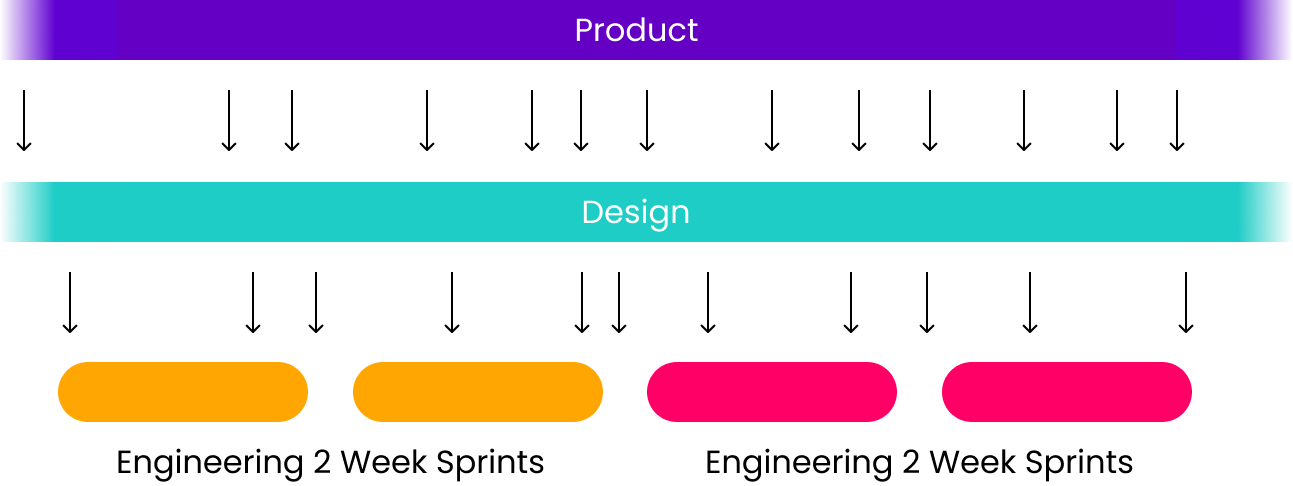
We anchored our process in the same two-week sprint cadence as Engineering, but gave Design a head start. Product was responsible for planning ahead so that designers could spend the first few days of each sprint clarifying requirements, asking questions, and preparing to focus deeply.
This structure gave:
- Designers breathing room to do focused work
- Product visibility and predictability
- Engineering confidence during sprint grooming and planning
Priorities still shifted mid-sprint from time to time, but now, the impact was visible and manageable.
BEFORE
Previously, only engineering operated on a sprint planning cadence. But for Product and Design, it was the wild, wild west.
AFTER
By aligning the designers with the same two-week sprint cadence as the engineers, we provided designers with the necessary time and space to focus on prioritized tasks and deliverables for each sprint. We were able to synchronize the team to the same beat, and the teams operated more efficiently and effectively.

2. Defining Design Stages
A sprint framework doesn’t mean design is “done” in two weeks. Instead, it provides a shared language for our partners to understand where the design work stands and what kind of feedback is appropriate.
One of the most important (and often overlooked) parts of creating time and space for great design is educating partners about the full value of design, beyond just “making it look good.”
Designers are not just pixel polishers. We’re problem solvers, system thinkers, storytellers, and researchers. We help uncover the right problems, shape the right solutions, and deliver cohesive, thoughtful experiences. To connect these values to practice, I created a clear, stage-based framework that broke down the design process into clear, digestible stages, making our process more transparent and predictable, and positioning design as a proactive, strategic partner.
Shifting Mindsets
Breaking design into these stages and setting up a clear framework upfront helps Designers work through each stage with intention and a bit of extra elbow room.
This also helps our partners understand where Designs is in the process, when their input is most valuable, how to engage with us, and a better sense of what Design can bring to the table and offer at each step, beyond pixels. It made collaboration easier, created better timing for feedback, and positioned designers as problem-solvers throughout the product development cycle.
We weren’t just designing screens, we were designing outcomes. And this structure helped us get there, together.
The Design Stages
↓
↓
↓
↓
Product Discovery
Identifying opportunities, concepting, and ideation
In this early stage, we help define the opportunity space in collaboration with Product, Research, and Data. Design plays a strategic role by:
- Framing the problem
- Identifying customer pain points
- Mapping out user journeys and system flows
- Facilitating ideation sessions
- Identifying risks and assumptions
- Supporting hypothesis generation, success metrics, and validation
- Aligning to business goals
- Analyze competitive landscape
This phase is about shaping the “why” before jumping to the “how.” Design contributes by facilitating workshops, mapping user journeys, identifying friction points, and concepting initial directions, often before a single wireframe exists. Educating partners on this front helped shift the perception of design from a reactive service to a proactive thought partner.
Early Explorations
High-level options, user journeys, and UXR testing
Once we’ve aligned on the opportunity, we begin sketching out possibilities, high-level directions, and key user moments. This is the space for:
- Broad thinking
- Storyboarding user flows or experience maps
- Low-fidelity wireframes (sketches)
- Explorations of different UX approaches or interaction models
- Rapid prototyping and testing with users
At this stage, fidelity is intentionally low. The goal is to generate ideas, test assumptions, and collaborate early, not to finalize layouts or colors. This is the ideal moment for open collaboration and early feedback on structure and flow, especially from Research, PMs, and Engineering.
We make it clear to partners: don’t focus on colors or spacing yet. Help us stress-test the thinking and validate ideas.
Define UX
Detailed interactions, wires, specs
This is where the design starts to take shape. We commit to a direction and begin defining:
- High-fidelity wireframes
- Detailed interaction specs
- Core interaction patterns
- State flows and edge case handling
- Responsive behaviors and accessibility considerations
- User flow validation
- Design documentation and handoff prep
Feedback at this stage should focus on whether the solution is complete, coherent, and buildable. It’s too late to pivot to entirely new concepts, but still early enough to refine structure and solve usability challenges.
This stage is highly collaborative with Engineering and Product. We work through feasibility, uncover technical constraints, and ensure that everything is defined clearly enough to begin implementation planning.
Polish & Asset Delivery
Final visual design, polish, and asset deliveries
Now we lock in the visuals. The team focuses on:
- Visual consistency across states and devices
- Branding, styling, and layout refinement
- Motion and micro-interaction polish
- Asset preparation (icons, illustrations, components)
- Figma handoff files, component documentation
This is where the product starts to feel real. Feedback at this point should be limited to visual tweaks, and not structural changes.
Design QA
Implementation quality and consistency
Design QA is often undervalued, but it’s critical. Even the best designs fall apart without the time and space to ensure they’re implemented correctly. We treat QA as a distinct step where designers:
- Compare the build against design specs
- Flag discrepancies or missed details
- Test responsive behavior and edge cases
- Ensure accessibility and interaction consistency
- Partner with Engineers on final polish and fixes
This phase closes the loop and ensures the experience we ship is the one we envisioned. It also build trust, both in the process and in the quality of our work.
3. Critiques & Reviews
Critiques
A critical part of the design process is gathering feedback and input to improve solutions, but it is most effective when it’s the right kind at the right time.
To facilitate this, I established:
- Twice weekly critiques, inspired by practices at Polyvore
- Async sharing in Slack
- Ad-hoc feedback sessions when needed
I guided the team to:
- Share work early, even when rough
- Ask for the type of feedback they needed
- Focus critiques on identifying problems, not prescribing solutions
We avoided turning the critique into a brainstorm. If broader explorations were needed, we saved it for a separate session.

Since the critiques were amongst design peers, we simplified it to three and grouped the stages to facilitate our feedback sessions.
Early IxD (Combined Product Discovery and Early Explorations)
High-level options, user journeys, research testing plans, flows, brainstorms, structural information, information architecture, and overviews.
⏤ Not the time for detailed interaction or visual, pixel-level feedback.
Detailed IxD
Comprehensive wireframes, interactions, and detailed UX specs.
⏤ Too late for structural changes; too early for visual design feedback.
VisD
Visuals, branding, polish, and pixel-level details.
⏤ If big interaction changes surfaced here, it flagged a gap in earlier stages.
Reviews
Reviews were the final checkpoint: a moment for me to catch any issues, ensure team alignment, and uphold our bar for quality. If work skipped the earlier feedback looks, it signaled a process breakdown we’d address head-on.
🗝️ Fostering Individual Ownership
Most importantly, I empowered designers to own their decisions. As the people closest to the product, they were best equipped to advocate for the right solutions, while taking in feedback and making smart, informed calls.
4. Intake & Project Management
I tested various tools (Trello, Airtable, Monday) that worked well for designers, but didn’t integrate cleanly with our partners. While these tools offered designers a better user experience and interface, the most effective collaboration with partners occurred when we used Jira, the same tool as our engineers.
Eventually, I embraced Jira (reluctantly 😅) and worked closely with our Jira support team to make it less painful and more intuitive for design. We streamlined sprints, removed clutter, and built a design-friendly version of agile.
The best process was when it didn’t feel like a process, when each intentional step leads to meaningful and valuable design outputs.
I established the following workflow:
- Sprint Planning – first day of the sprint
- PMs came prepared with clear, scannable tickets and provided a brief overview.
- Designers gave effort estimates and took ownership of tickets
- During the sprint
- Designers moved work across four states:
- Open → In Progress → In Review → Done (or Hold)
This lightweight system gave Product visibility and let Design stay focused. It worked because it didn’t feel like process for the sake of process.
The Effects
More Focus, More Trust, More Joy
Over time, our collaboration matured. Ticket titles shifted from vague ones like:
YUXD-123: Bigger Submit Button
To signals of shared vision:
YUXD-123: Early Exploration - Brainstorm retention ops for XYZ next quarter
That’s when I knew we were doing something right. Designers felt empowered. Partners felt confident. And we were all building better products together 😍
Bonus
Making It Easy for New Partners
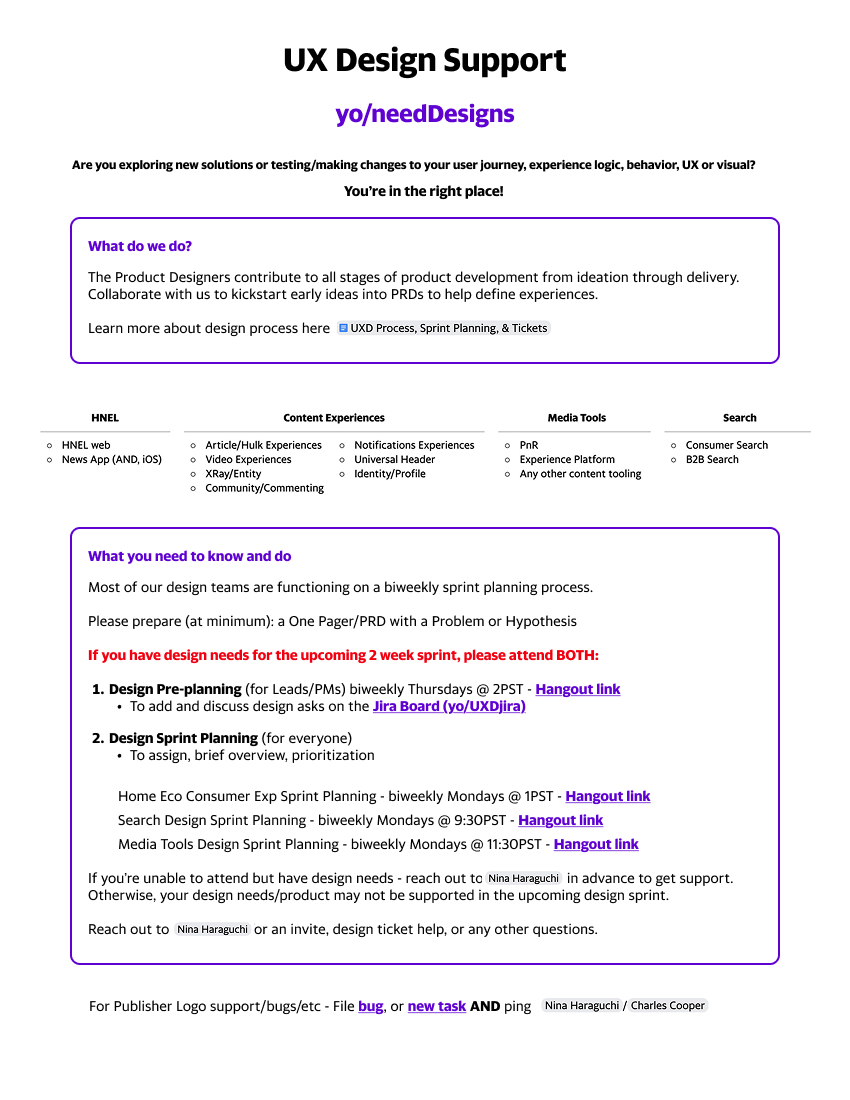
I created a shortcut page with our process overview, critique guidance, and tips for how to best work with Design. New partners could ramp up quickly, and it saved the team from repeating the same onboarding conversations.
COFFEE? TEA? LET’S CHAT!
Curious for More?
This overview only scratches the surface.
Let me know if you’d like to explore the deeper strategy, decisions, or outcomes together.

HELLO 👋
Let’s Connect!
Thanks so much for checking out my work.
Feel free to reach out! I’d love to chat, share more, or explore ways we can collaborate!